CSV File
In MEDiml every dataset must have a csv file along with it, this file contains information
about the scans in the dataset that will be used in the radiomics analysis, especially region of interest (ROI) names used in
each scan. Since scans can have multiple regions of interest (ROIs), the user needs to specify for each scan the ROI name(s) to use
for the processing and radiomics extraction. The csv files are also used by the DataManager in pre-checks and
summary creation (after raw data processing). The different columns of the file are:
PatientID: The scan patient ID, for example:
"Glioma-TCGA-001".ImagingScanName: Type of the imaging modality, usually
"CT"for CT scans,"PT"for PET scans and MRI sequence for MR scans ("T1","T2"…).ImagingModality: Imaging modality (
"CTscan","MRscan"or"PTscan").ROIname: ROI name for the analysis. Either addition or subtraction of multiple ROI names or a single ROI name. Every ROI name is put between brackets then added or subtracted to other ROI names. For example:
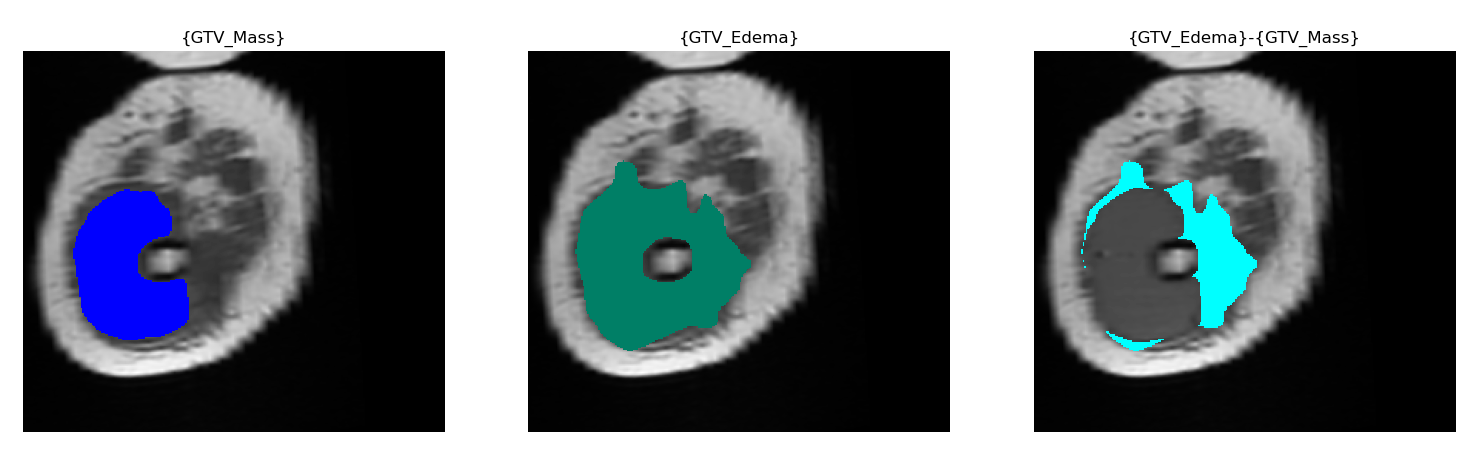
"{GTV_Edema}-{GTV_Mass}", which means"GTV_Mass"will be subtracted from"GTV_Edema"in the analysis. The following picture shows the result of this subtraction:
Note
The ROIname must be the same for all the scans in the csv file because scientifically, we process the same
ROI in a radiomics analysis.
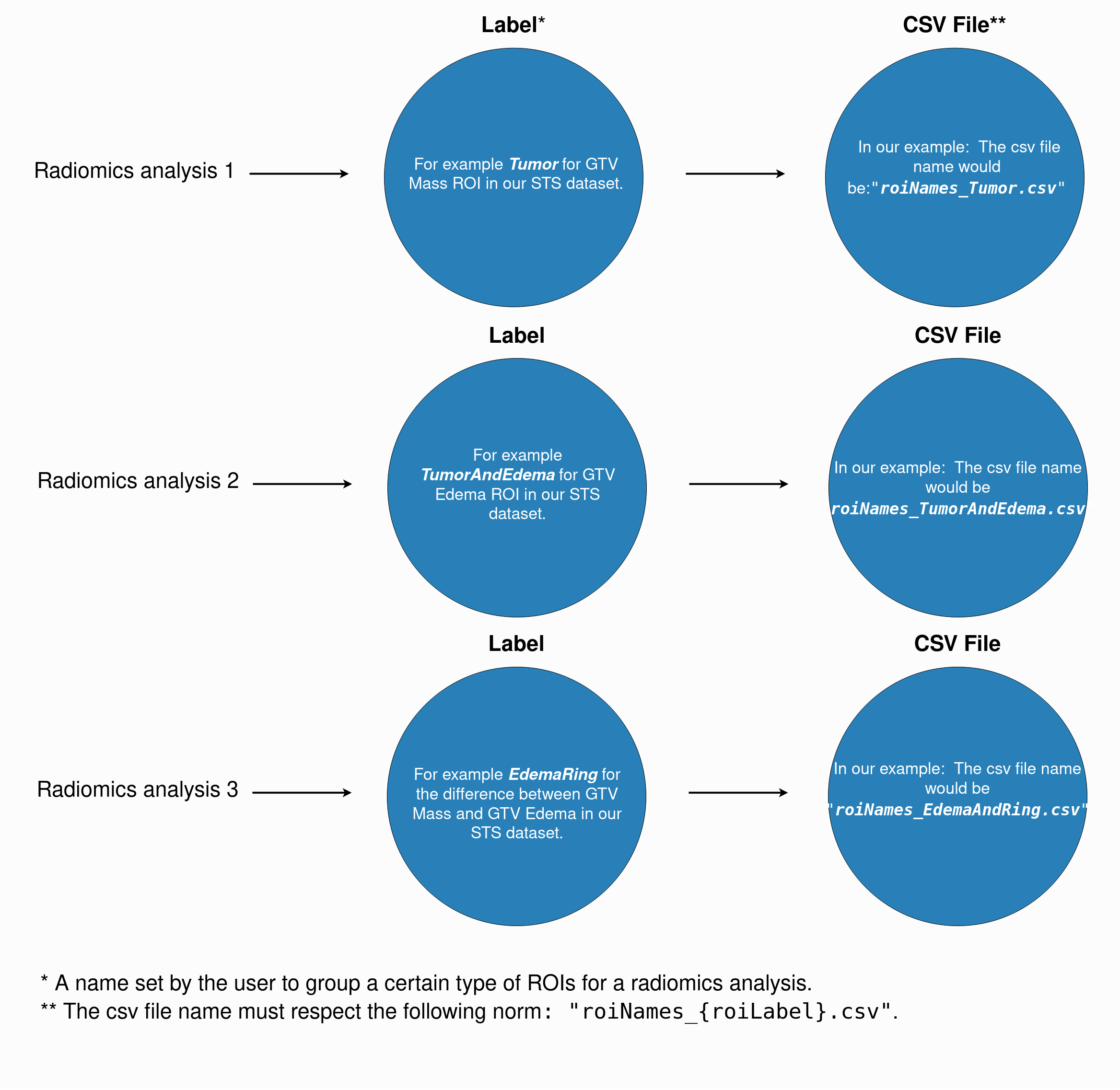
The csv files must respect the following naming norm: "roiNames_{roiLabel}.csv". The following figure gives a detailed example on how to choose
your dataset ROI label and how to name your csv files:
The following tables are an example of csv files for the same dataset Soft-Tissue-Sarcoma (STS) cancer consisting of different modalities (MR, CT and PET), different ROIs (GTV mass and GTV edema) and each table is for different radiomcis analysis:
Radiomics analysis 1:
"Tumor".
PatientID |
ImagingScanName |
ImagingModality |
ROIname |
|---|---|---|---|
STS-McGill-001 |
T1 |
MRscan |
{GTV_Mass} |
STS-McGill-001 |
T2 |
MRscan |
{GTV_Mass} |
STS-McGill-002 |
CT |
CTscan |
{GTV_Mass} |
STS-McGill-003 |
PET |
PTscan |
{GTV_Mass} |
Radiomics analysis 2:
"TumorAndEdema".
PatientID |
ImagingScanName |
ImagingModality |
ROIname |
|---|---|---|---|
STS-McGill-001 |
T1 |
MRscan |
{GTV_Edema} |
STS-McGill-001 |
T2 |
MRscan |
{GTV_Edema} |
STS-McGill-002 |
CT |
CTscan |
{GTV_Edema} |
STS-McGill-003 |
PET |
PTscan |
{GTV_Edema} |
Radiomics analysis 3:
"EdemaRing".
PatientID |
ImagingScanName |
ImagingModality |
ROIname |
|---|---|---|---|
STS-McGill-001 |
T1 |
MRscan |
{GTV_Edema}-{GTV_Mass} |
STS-McGill-001 |
T2 |
MRscan |
{GTV_Edema}-{GTV_Mass} |
STS-McGill-002 |
CT |
CTscan |
{GTV_Edema}-{GTV_Mass} |
STS-McGill-003 |
PET |
PTscan |
{GTV_Edema}-{GTV_Mass} |
Note
It is pointless in our case but it’s possible to analyze the addition of multiple ROIs, for example: "{GTV_Edema}+{GTV_Mass}".
Future works of MEDiml will aim to automate the creation of these csv files for each dataset and to implement ROIs intersection as well.
Creating the ROI CSV File
The CSV file is a critical component of the MEDiml feature extraction pipeline. It specifies which regions of interest (ROI) to analyze for
each patient scan. Without a properly formatted CSV file, the BatchExtractor cannot proceed with feature extraction.
Why the CSV file matters:
It tells
MEDimlwhich ROI to extract features from for each patient/scan combinationIt allows you to analyze different ROI combinations across the same dataset
Multiple variants can be generated to explore different analytical approaches (single ROI, combined ROIs, ROI subtractions)
The same raw dataset can be used for multiple independent analyses by simply providing different CSV files
Manual creation vs. automated generation:
While you can manually create a CSV file by hand, the generate_roi_csv.py script automates this process. It scans your dataset,
discovers all available ROIs in your DICOM RTstruct files or NIfTI masks, and generates multiple CSV options for different analytical strategies.
Automated CSV Generation
The generate_roi_csv.py script is located in the scripts/ directory. It requires:
A dataset organized according to the MEDiml conventions (
PatientID/ImagingScanName/files)DICOM RTstruct files (for DICOM data) or NIfTI mask files (for NIfTI data) containing ROI information
Python 3.6+ with dependencies:
pydicom,pandas,tqdm
Dependencies required:
Before running the script, make sure you activate your MEDiml environment using Conda:
conda activate mediml
or using Poetry:
poetry shell
or using your default Python environment, install the required dependencies with pip:
pip install pydicom pandas tqdm
Usage - Interactive Mode (Recommended for first-time users):
python scripts/generate_roi_csv.py \
  --dataset-path /path/to/your/dataset \
  --dicom-or-nifti dicom \
  --output-dir /path/to/output
The script will:
Scan your dataset and extract all ROI names
Display available generation options with previews
Prompt you to select which options to generate
Ask for an ROI label (e.g., “Tumor”, “Brain”, “Targets”)
Save CSV files to the output directory
Usage - Non-Interactive Mode (For scripting/automation):
python scripts/generate_roi_csv.py \
  --dataset-path /path/to/dataset \
  --dicom-or-nifti dicom \
  --output-dir /path/to/output \
  --options A C D \
  --roi-label Tumor
This mode is useful when you want to automate CSV generation in your analysis pipelines.
Command-line arguments:
--dataset-path(required): Path to your dataset organized by PatientID/ImagingScanName--output-dir(required): Directory where CSV files will be saved--dicom-or-nifti(required): Specifydicomorniftidepending on your data format--options(optional): Space-separated list of options to generate (A, B, C, D). If omitted, runs in interactive mode--roi-label(optional): Label for the output CSV filename (default: “ROI”)
Four CSV Generation Options
The script generates up to four different CSV variants. You can select which ones to create based on your analysis goals:
Option A: Single ROI per Patient (Always available)
Each patient-scan combination is assigned the same ROI. Use this for standard single-ROI radiomic analysis.
Example output:
PatientID,ImagingScanName,ImagingModality,ROIname
STS-McGill-001,T1,MRscan,{GTV_Mass}
STS-McGill-001,PET,PTscan,{GTV_Mass}
STS-McGill-002,T1,MRscan,{GTV_Mass}
STS-McGill-002,CT,CTscan,{GTV_Mass}
Option B: All Possible ROI Combinations (Available if < 10 unique ROIs)
Generates all possible combinations where each patient can have a different ROI selection. Useful for exploring which ROI combination produces the best predictive performance.
Example scenario: If Patient 1 has {GTV_Mass} and {GTV_Edema}, and Patient 2 has only {GTV_Mass}, this generates
combinations such as:
Combination 1:
PatientID,ImagingScanName,ImagingModality,ROIname
STS-McGill-001,CT,CTscan,{GTV_Mass}
STS-McGill-002,CT,CTscan,{GTV_Mass}
Combination 2:
PatientID,ImagingScanName,ImagingModality,ROIname
STS-McGill-001,CT,CTscan,{GTV_Edema}
STS-McGill-002,CT,CTscan,{GTV_Mass}
This allows you to generate separate radiomic models for each combination and compare their performance.
Option C: All ROIs Combined (Available if multiple ROIs detected)
For each patient, all available ROIs are combined using the + operator. Use this when you want a comprehensive analysis
that includes all available anatomical structures.
Example output:
PatientID,ImagingScanName,ImagingModality,ROIname
STS-McGill-001,T1,MRscan,{GTV_Mass}+{GTV_Edema}
STS-McGill-001,PET,PTscan,{GTV_Mass}+{GTV_Edema}
STS-McGill-002,T1,MRscan,{GTV_Mass}
STS-McGill-002,CT,CTscan,{GTV_Mass}+{GTV_Edema}+{Necrosis}
In MEDiml, {ROI1}+{ROI2} means extract features from voxels in both ROI1 and ROI2.
Option D: All Possible Subtractions (Available if multiple ROIs detected)
Generates all pairwise ROI subtractions. Useful for analyzing specific anatomical regions and their boundaries, such as edema around a tumor or necrotic regions within a mass.
Example output (subtract_GTV_Edema_minus_GTV_Mass):
PatientID,ImagingScanName,ImagingModality,ROIname
STS-McGill-001,T1,MRscan,{GTV_Edema}-{GTV_Mass}
STS-McGill-001,PET,PTscan,{GTV_Edema}-{GTV_Mass}
STS-McGill-002,T1,MRscan,{GTV_Mass}
STS-McGill-002,CT,CTscan,{GTV_Edema}-{GTV_Mass}
In MEDiml, {ROI1}-{ROI2} means extract features from voxels in ROI1 but NOT in ROI2 (the “ring” region).
Example output (subtract_GTV_Mass_minus_GTV_Edema):
PatientID,ImagingScanName,ImagingModality,ROIname
STS-McGill-001,T1,MRscan,{GTV_Mass}-{GTV_Edema}
STS-McGill-001,PET,PTscan,{GTV_Mass}-{GTV_Edema}
STS-McGill-002,T1,MRscan,{GTV_Mass}
STS-McGill-002,CT,CTscan,{GTV_Mass}-{GTV_Edema}
Practical Workflow Examples
Example 1: DICOM Dataset with Brain Metastases
You have a dataset with brain metastases where each patient has multiple treatment targets (target1, target2, target3).
Dataset structure:
brain_mets_data/
├── BrainMets-UCSF-00017/
│   └── Dose/
│       ├── dose_image.dcm
│       └── rtstruct_targets.dcm        # Contains ROIs: target1, target2, target3
├── BrainMets-UCSF-00019/
│   └── Dose/
│       └── rtstruct_targets.dcm        # Contains ROI: target1
└── BrainMets-UCSF-00035/
    └── Dose/
        └── rtstruct_targets.dcm        # Contains ROIs: target1, target2
Generate CSV files interactively:
python scripts/generate_roi_csv.py \
  --dataset-path brain_mets_data \
  --dicom-or-nifti dicom \
  --output-dir brain_mets_data/roi_csv
Script output (abbreviated):
Scanning dataset at brain_mets_data
Found 3 patients
Found 3 unique ROI names

📋 OPTION A: Single ROI per Patient
- All patients analyzed with the same target
Number of rows: 3

📋 OPTION C: All ROIs Combined
- Patients with multiple targets get all targets combined
Number of rows: 3

📋 OPTION D: All Possible Subtractions
Number of subtraction variants: 2

🔧 SELECT OPTIONS TO SAVE
Save OPTION A? [y/n]: y
Save OPTION C? [y/n]: y
Save OPTION D? [y/n]: y
Enter ROI label: Targets
Generated files:
brain_mets_data/roi_csv/
├── roiNames_Targets.csv                          # Option A
├── roiNames_Targets_combined.csv                 # Option C
├── roiNames_Targets_subtract_target1_minus_target2.csv
├── roiNames_Targets_subtract_target2_minus_target1.csv
├── roiNames_Targets_subtract_target1_minus_target3.csv
└── generation_summary_Targets.json
Now use the CSV file with MEDiml:
from MEDiml.biomarkers import BatchExtractor

be = BatchExtractor(
    path_read=brain_mets_data,
    path_csv='brain_mets_data/roi_csv/roiNames_Targets.csv',
    path_params='path/to/your/config.yml',
    path_save='path/to/save/processed/data',
    use_dicoms=True
)
Example 2: Multi-Modality Tumor Dataset (DICOM)
You have a dataset with tumors imaged with multiple modalities (CT, MR, PET) where ROIs include tumor mass and edema.
Dataset structure:
tumor_dataset/
├── STS-McGill-001/
│   ├── CT/
│   │   ├── ct_image.dcm
│   │   └── rtstruct.dcm                # ROIs: GTV_Mass, GTV_Edema
│   ├── MR_T1/
│   │   ├── mr_image.dcm
│   │   └── rtstruct.dcm                # ROIs: GTV_Mass, GTV_Edema
│   └── PET/
│       ├── pet_image.dcm
│       └── rtstruct.dcm                # ROI: GTV_Mass
├── STS-McGill-002/
│   ├── CT/
│   │   └── rtstruct.dcm                # ROI: GTV_Mass
│   └── MR_T1/
│       └── rtstruct.dcm                # ROIs: GTV_Mass, GTV_Edema
└── STS-McGill-003/
    ├── CT/
    │   └── rtstruct.dcm                # ROIs: GTV_Mass, GTV_Edema, Necrosis
    └── MR_T1/
        └── rtstruct.dcm                # ROIs: GTV_Mass, GTV_Edema, Necrosis
Generate non-interactively with multiple options:
python scripts/generate_roi_csv.py \
  --dataset-path tumor_dataset \
  --dicom-or-nifti dicom \
  --output-dir tumor_dataset/roi_csv \
  --options A C D \
  --roi-label Tumor
This creates three CSV files without prompting:
roiNames_Tumor.csv- Standard analysis with a single ROI per patientroiNames_Tumor_combined.csv- Combined mass and edema analysisroiNames_Tumor_subtract_*.csv- Multiple files for different edema/mass combinations
Example 3: NIfTI Dataset
For NIfTI data, the script reads ROI names from the file naming convention. File names must follow the format:
PatientID__ImagingScanName(ROIname).Modality.nii.gz
Example files:
tumor_nifti_dataset/
├── STS-McGill-001/
│   ├── STS-McGill-001__CT(GTV_Mass).CTscan.nii.gz
│   ├── STS-McGill-001__CT(GTV_Mass).ROI.nii.gz
│   ├── STS-McGill-001__CT(GTV_Edema).CTscan.nii.gz
│   └── STS-McGill-001__CT(GTV_Edema).ROI.nii.gz
└── STS-McGill-002/
    ├── STS-McGill-002__CT(GTV_Mass).CTscan.nii.gz
    └── STS-McGill-002__CT(GTV_Mass).ROI.nii.gz
Generate CSV:
python scripts/generate_roi_csv.py \
  --dataset-path tumor_nifti_dataset \
  --dicom-or-nifti nifti \
  --output-dir tumor_nifti_dataset/roi_csv
Understanding the Generated CSV Output
Each generated CSV file has four required columns:
PatientID: Patient identifier (e.g.,STS-McGill-001)ImagingScanName: Imaging acquisition name (e.g.,CT,T1,Dose)ImagingModality: Type of imaging (e.g.,CTscan,MRscan,PTscan)ROIname: ROI specification with braces and operators (e.g.,{GTV_Mass},{GTV_Mass}+{Edema})
Important notes on ROI names:
ROI names must always be enclosed in curly braces:
{ROIname}Multiple ROIs are combined with
+for union:{ROI1}+{ROI2}analyzes both structures togetherMultiple ROIs are separated with
-for subtraction:{ROI1}-{ROI2}analyzes ROI1 excluding ROI2The same ROI specification applies to all patients in a single CSV file for consistency
If the ImagingModality column contains UnknownModality, you should manually update it based on your actual imaging types
before using the CSV with MEDiml.
Verifying Generated CSV Files
After generation, check that the CSV files are properly formatted:
Verify structure: Each CSV should have exactly 4 columns
Check row count: Number of rows should match your patient-scan combinations
Verify ROI names: ROI names should be wrapped in braces:
{ROIname}Update modalities: Replace
UnknownModalitywith actual types if neededReview the summary: Check the generated
generation_summary_*.jsonfile for details
Example inspection using Python:
import pandas as pd

df = pd.read_csv('roiNames_Tumor.csv')
print(f"Rows: {len(df)}")
print(f"Columns: {list(df.columns)}")
print(f"\nFirst few rows:")
print(df.head())
print(f"\nUnique ROI specifications:")
print(df['ROIname'].unique())
Troubleshooting
Problem: No ROIs found
Verify DICOM files are RT Structure Sets (contain ROI definitions)
For NIfTI: Verify file names match the expected format
Check file permissions
Problem: “ImagingModality is UnknownModality”
This is expected. Update the CSV manually before using with MEDiml:
import pandas as pd

df = pd.read_csv('roiNames_Tumor.csv')
modality_map = {
    'CT': 'CTscan',
    'PET': 'PTscan',
    'T1': 'MRscan',
    'T2': 'MRscan'
}
df['ImagingModality'] = df['ImagingScanName'].map(modality_map)
df.to_csv('roiNames_Tumor.csv', index=False)
Problem: Too many combinations generated
If Option B creates too many variants, you can manually filter the CSV files or regenerate with only essential options (A, C, D).